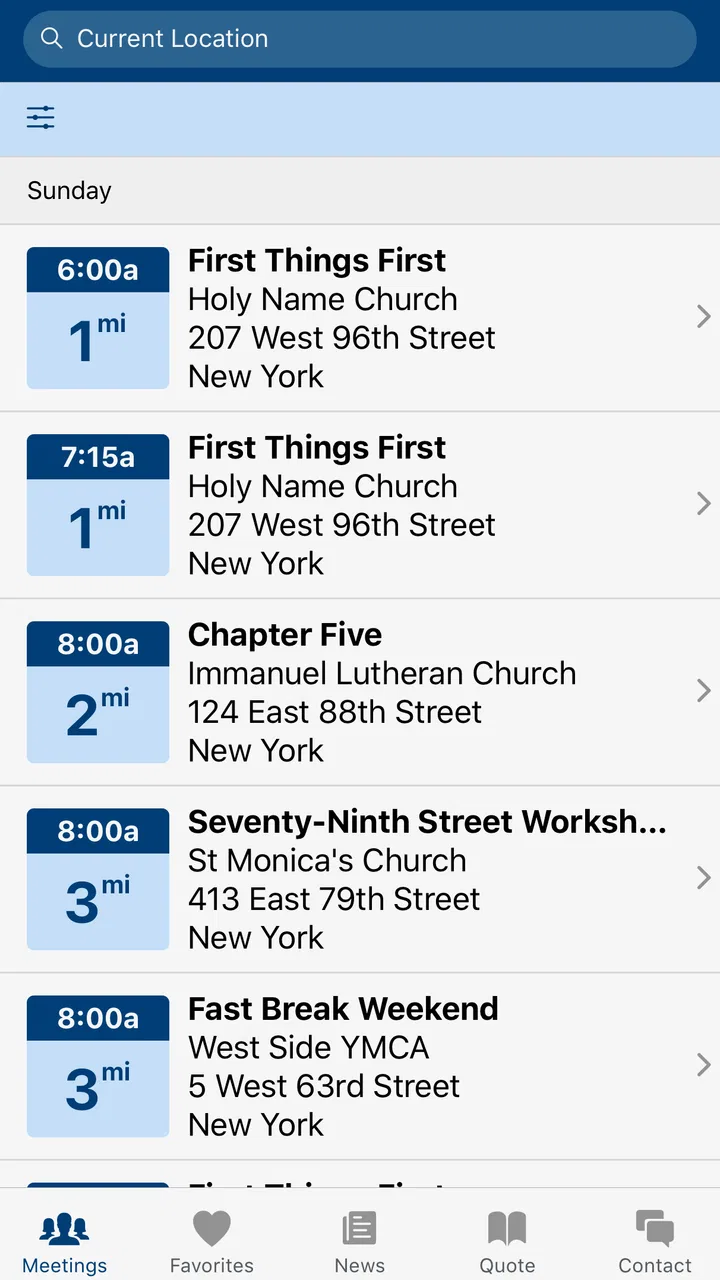
Meeting Guide
- 4.6
- Rating
- 1.00M
- Installs
- Free
- Price

 Analysis by App-foxy
I found Meeting Guide most useful when I treated it as a practical doorway into Alcoholics Anonymous rather than as a general recovery app. Its purpose is focused: it puts A.A. meeting information into an easier format to reach when I need it. That narrow purpose is also its main strength. It does not try to replace a meeting, a sponsor, personal support, or the work of recovery. Instead, it helps reduce one of the first obstacles: figuring out where and when to go.
After spending time with it, my overall view is positive. The app feels designed for a person who may be searching under stress, traveling, returning to meetings after a break, or helping someone find a nearby option. The interface is not trying to entertain me or keep me scrolling. It is there to help me move from uncertainty to a possible meeting choice with as little friction as possible.
How Meeting Guide works in everyday use
The app belongs to the lifestyle category and is developed by A.A. World Services, Inc. It is free, carries an Everyone age rating, and has reached over a million installs. Those details matter because they match the app’s practical role: it is accessible to a broad audience and does not put a payment decision between a user and basic meeting information.
You May Also Like

 Blood Strike: 2.5 Anniversary
Blood Strike’s Loadouts Turn Every Drop Into a Tactical Gamble
A close look at Blood Strike’s custom loadouts: how fast access to signature weapons reshapes its battle royale rhythm, rewards preparation, and narrows the gap between fights.

 Pandora - Music & Podcasts
Pandora’s Music Is Easy to Start, but Harder to Recover
Pandora’s strength is its low-effort path from a seed to a station. Its weak spot is how much confidence it asks you to place in connection, setup, and quiet recovery.

 8 Ball Pool
 Is Built on Rivalries, Rematches, and Routine
A close look at the rivalries, rematches, shared routines, and unanswered safety questions that turn a quick pool match into a persistent mobile community.

 Samsung Music
’s Quiet Strength Is Playing What You Already Own
Its reach comes less from spectacle than from dependable access to a personal library. That simplicity is both the app’s strongest retention engine and its ceiling.

 AccuWeather: Weather Radar
AccuWeather Review: A Quick, Clear Forecast for Everyday Decisions
For everyday plans, the best forecast is the one you can understand quickly. AccuWeather makes rain timing, radar, and local conditions easy to act on, with a few trade-offs.

 Hill Climb Racing
Why Hill Climb Racing Still Turns Crashes Into One More Run
A tiny car, a bumpy hill and one more upgrade: Hill Climb Racing keeps resurfacing because its simple chaos makes every near-miss feel personal.
More From Our News Desk



When I open it, I think of the experience as a quick lookup rather than a destination. Someone might be sitting in a car before work, staying in an unfamiliar town, or looking for an evening meeting after a difficult day. In each case, the useful question is simple: what meeting information can I access from here, and which option seems workable?
That simplicity is more valuable than it may sound. A web search can produce scattered results, outdated-looking pages, or several unrelated directories. A general map app can show places, but it may not present meeting details in the way a person seeking A.A. support expects. Meeting Guide is more focused, so I spend less time translating a broad search into the specific information I actually need.
I also appreciate that the app does not make the first step feel like a commitment. Looking for a meeting is not the same as deciding exactly how recovery will proceed. A person can check the available information, consider the time and location, and decide what feels manageable. That lower-pressure workflow makes the app especially suitable for someone who is hesitant or overwhelmed.
The strongest part is its focused purpose
The best evidence of the app’s value is how well it handles a very specific problem. If I already know the meeting I want, I may not need an app at all. But if I need to discover possibilities, compare practical choices, or find information while away from my usual area, a dedicated meeting guide is more useful than a generic lifestyle tool.
One realistic scenario is a person who normally attends a local meeting but has to spend a few days elsewhere. Rather than asking several people for recommendations or searching through unrelated results, that person can use the app as a starting point for locating meeting information in the new area. The important benefit is not flashy technology; it is continuity. A change in routine does not have to mean abandoning the routine completely.
Another scenario is a newcomer who does not yet know the language of meeting schedules or the difference between various meeting options. I would use the app to gather the basic choices first, then contact a trusted person or local A.A. resource if I needed help understanding which one might suit me. That is a sensible division of labor: the app helps with discovery, while people provide context and support.
A useful habit is to check the information before leaving rather than waiting until the last minute. Meeting details can be affected by local circumstances, and an app should not be treated as a substitute for common sense. I would confirm the location and timing as carefully as possible, especially if the trip is long or the meeting is important to my plans. The app makes finding options easier, but I still remain responsible for deciding whether the information fits my situation.
I also see value in using it during a moment when concentration is limited. Recovery-related searches can happen when a person is tired, anxious, or emotionally distracted. A narrowly designed tool can be easier to approach than a large website filled with unrelated material. The less effort required to begin, the better the chance that a user will continue toward a real source of support.
Where it compares well with ordinary alternatives
The usual alternatives are a search engine, a map application, a local website, or asking someone directly. Each has a place, but none is automatically better in every situation. A search engine is flexible, yet flexibility can create noise. A map app is familiar, yet it may emphasize navigation rather than meeting information. A local website may contain useful details, but the experience can vary significantly from one area to another.
Meeting Guide’s advantage is concentration. It is built around the meeting-search task, so I do not have to begin with broad keywords or guess which local page is current. That makes it a better first stop when I want a focused answer rather than a wide collection of search results.
However, I would not call it a complete replacement for those alternatives. A map app may still be better for planning the actual route, estimating travel time, or checking nearby landmarks. A local contact may be better for answering questions about accessibility, the atmosphere of a particular meeting, or what a newcomer should expect. The strongest workflow combines the app with those tools instead of expecting one screen to solve every practical and personal question.
There is also an important distinction between information and reassurance. Meeting Guide can help me identify an option, but it cannot offer the human encouragement that may be needed to attend. If I were nervous about going alone, I would use the app to find a possibility and then reach out to someone I trust. That is not a weakness unique to this app; it is simply the boundary between a directory and a support relationship.
The meaningful limitation: information still needs judgment
The app’s focused design can also feel limited if I expect a full recovery companion. It is not the right choice for someone looking for extensive educational material, personal journaling, habit tracking, therapy, or a broad collection of wellness tools. Its value depends on whether meeting information is the problem I am trying to solve.
I would also avoid assuming that every listed detail answers every question a first-time visitor might have. A schedule can tell me when and where something is planned, but it may not explain the room layout, parking, accessibility, format, or whether a particular meeting feels comfortable for my needs. If one of those factors matters, I would verify it through an appropriate local contact instead of making assumptions.
That extra step may feel like friction, especially for a person who wants certainty before leaving home. Still, I think it is healthier than pretending a directory can provide a complete picture of a meeting. The app lowers the barrier to finding an option; it does not remove the need to check details that affect a person’s comfort and safety.
Another limitation is emotional rather than technical. A person in immediate danger, facing a medical emergency, or needing urgent mental-health care should not rely on a meeting-finder app as the only response. Meeting information can be part of a support plan, but urgent situations require the appropriate emergency or professional help. I consider that an important boundary for anyone deciding how to use the app.
The app’s current version is 5.0.5, and it supports devices running Android 8.0 or later. For someone using an older device, compatibility becomes a practical consideration before downloading. On a supported phone, the experience is likely to be most useful when the user keeps expectations realistic: it is a focused information tool, not a complete digital recovery program.
Small workflow choices that make it more useful
My first tip is to use Meeting Guide before the need becomes urgent. I would look at possible meeting information during a calm part of the day, note which options fit my schedule, and keep a general plan in mind. That turns the app from an emergency search into part of a routine. When a difficult moment arrives, I am less likely to be making every decision from scratch.
My second tip is to compare practicality, not just distance. The nearest option is not always the best one if its timing conflicts with work, transport, family responsibilities, or energy levels. I would consider whether I can realistically get there and return, rather than choosing only by what appears closest. A slightly less convenient meeting that I can actually attend may be more valuable than a nearby option that does not fit my day.
My third tip is to use the app as a conversation starter. If I am unsure about attending, I can show the meeting information to a sponsor, friend, family member, or another trusted person and ask for help making a plan. That is more constructive than silently browsing and never taking the next step. The app provides a concrete subject for the conversation, which can make asking for support easier.
A fourth useful approach is to prepare for unfamiliar locations. If I am traveling, I would check meeting information early enough to understand the area and then use a separate navigation tool if needed. I would also leave room for changes in my plans. This two-step process is better than expecting the meeting guide to function as a full travel planner.
Finally, I would treat the app as a starting point for repeated use, not just a one-time download. Someone returning to meetings may need to rebuild confidence gradually. Having a familiar place to check can make that process feel more manageable. The app cannot create motivation, but it can remove one avoidable task from the path.
Who will get the most from it
I think Meeting Guide is a strong fit for people who attend A.A. meetings regularly and want a convenient way to look up options. It is also well suited to newcomers who need a straightforward first step, people who have moved or are traveling, and anyone supporting another person who wants meeting information without searching through a large amount of unrelated content.
Its free price is particularly helpful for users who want to explore the tool without adding another expense. The average rating is 4.7 from around 4,800 ratings, with roughly 1,500 written reviews, which suggests that many users find the focused approach worthwhile. I would still judge it by my own needs rather than by popularity alone, because a high rating cannot tell me whether a local meeting’s details answer my specific questions.
The Everyone rating also makes it approachable for a wide range of users. Even so, age suitability does not mean every person will find the experience personally sufficient. Someone seeking private counseling, clinical guidance, detailed recovery lessons, or an all-in-one wellness dashboard should look elsewhere or use additional resources alongside it.
I would skip it if I do not need meeting information, if my main goal is route planning, or if I expect a social network and direct personal communication inside the app. A map service may be more useful for navigation, a local contact may be better for nuanced questions, and a professional service may be necessary for clinical concerns. Choosing the right tool depends on the task.
My final assessment
Meeting Guide succeeds because it does not overreach. It addresses a concrete need and keeps the path to meeting information relatively direct. In my experience, that makes it more useful than a broad recovery-themed app when the immediate question is simply where to look for an A.A. meeting.
Its limitations are equally clear. The app cannot guarantee that every practical question is answered, cannot replace human support, and should not be treated as emergency care. I would use it with sensible verification and with other people or services when the situation calls for more than a schedule and location.
For someone who wants a free, focused way to begin finding A.A. meeting information, I would recommend trying it. The best result comes from using it as a bridge: check the available options, choose one that fits real life, confirm the details that matter, and then take the human step of attending or asking for support. That is a modest role, but it is a meaningful one.
My verdict: Meeting Guide is a practical companion for discovering A.A. meeting information, especially for newcomers, travelers, and people rebuilding a regular routine. It is not a complete recovery solution, but within its purpose, its simplicity is a genuine advantage.
FAQs for Meeting Guide
01What is the primary purpose of the Meeting Guide app?
The Meeting Guide app is designed to help users locate Alcoholics Anonymous (AA) meetings quickly and efficiently. It aggregates meeting information from various local sources into a single, user-friendly platform. This ensures individuals can find meetings in their area based on location, time, and format preferences.
02How accurate is the meeting information provided by the app?
The Meeting Guide app collaborates directly with local AA Intergroups and service entities to ensure the accuracy of the meeting data. However, since updates depend on these local sources, users are encouraged to confirm meeting details directly with the hosting group if possible, especially during holidays or inclement weather.
03Does the Meeting Guide app require an internet connection to function?
Yes, the Meeting Guide app requires an internet connection to access the most current meeting information and updates. While some data might be cached for offline use, live updates and location-based searches necessitate an active internet connection, either via Wi-Fi or mobile data.
04Is the Meeting Guide app free to download and use?
Absolutely, the Meeting Guide app is free for all users. It does not contain in-app purchases or ads, ensuring a distraction-free experience. This aligns with the AA philosophy of being self-supporting and focused purely on providing a valuable resource to those seeking meetings.
05How user-friendly is the Meeting Guide app for newcomers?
The Meeting Guide app is designed with simplicity in mind, making it highly accessible for newcomers. It features an intuitive interface that allows users to search for meetings by location, day, and time. Additionally, the app provides clear navigation and easy-to-understand icons to ensure a smooth user experience for everyone.
Pros
- Simple and intuitive user interface.
- Real-time updates for meeting changes.
- Wide range of meeting types available.
- Offline access to saved meeting info.
- Customizable notifications for reminders.
Cons
- Limited to specific regions and groups.
- Requires internet for initial data load.
- No option for virtual meeting links.
- Occasional app crashes on some devices.
- Limited language options available.

Meeting Guide
Gallery